How to Start, Structure, and Scale Your Research Operations
Practical guide to start and improve you research
Resources
Dec 10, 2025

Design teams everywhere feel the same pain when Research Ops is missing: scattered research, lost insights, inconsistent methods, no recruitment process, and no time to do research properly.
Research Ops (Research Operations) exists to fix exactly that.
Press enter or click to view image in full size
Whether you’re a solo designer, part of a small team, or working inside a growing product organization, Research Ops can transform the way your company understands users. And the best part?
You don’t need a research team to begin.
I started implementing Research Ops in my company without any dedicated researchers, and you can too.
This article is a guide for any designer, PM, or UX practitioner who wants to introduce Research Ops and doesn’t know where to begin.
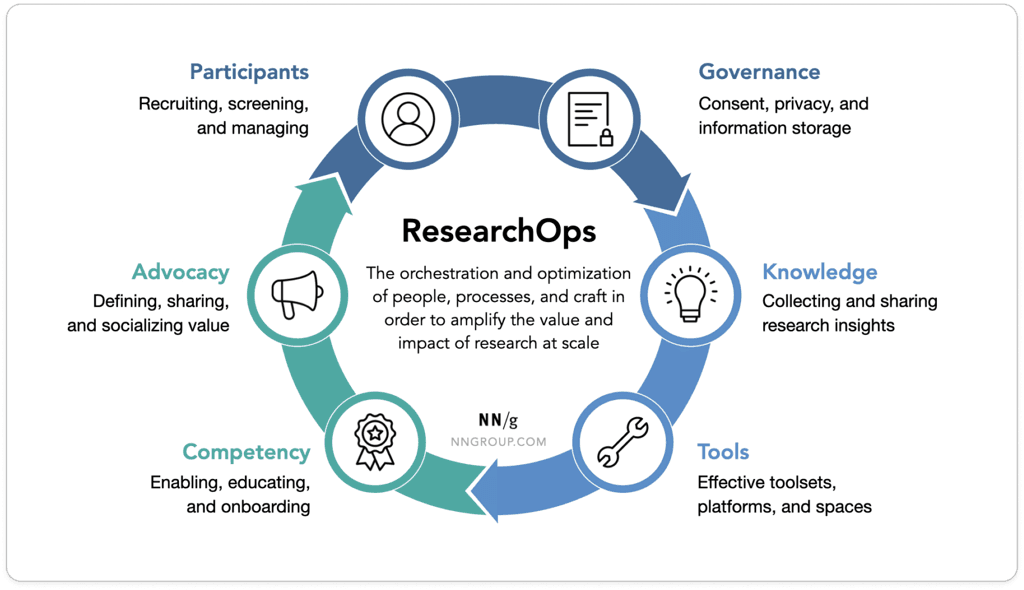
What Exactly Is Research Ops?
ResearchOps (short for Research Operations) is a specialized area of DesignOps focused on user-research practices. Research Ops includes all the processes, tools, and supports that make research structured, scalable, ethical, and impactful.
In practice, Research Ops helps you with:
Participant recruitment
Interview scheduling
Consent and legal compliance
Knowledge management
Tool selection and training
Templates and process documentation
Research culture and advocacy
Logistics, data backup, and governance
Think of it as everything that surrounds research, so designers can actually do research instead of getting stuck preparing it.
Why Every Team Needs Research Ops Even Without Researchers
Most teams think they “do research.” But without structure, three things usually happen:
Insights get lost
Interviews live in random folders, tools, or personal notes.Research becomes slow and inconsistent
Each designer reinvents the wheel, using different methods and formats.No one has a shared understanding of users
Personas go stale, insights aren’t reused, and decisions rely on partial data.
Research Ops addresses this by creating repeatable systems that make research visible, accessible, and usable across teams.
Beyond day-to-day chaos, there’s a clear macro trend: research is scaling faster than organizational processes.
More non-researchers (Designers, PMs) are running studies.
Research activity is increasingly embedded across Product and UX.
A single Research Ops specialist typically supports 10–25 people, and sometimes more in larger organizations.
Yet 62% of companies still have no Research Ops function, even as research volume increases.
The result? Without Research Ops, more research often means more cost, duplication, and inefficiency. With Research Ops, teams benefit from shared assets, standardized workflows, and economies of scale.
At its core, Research Ops turns research from isolated efforts into a repeatable engine, one that scales with your organization and improves speed, quality, and reuse of knowledge over time.
Your practical starting plan (step‑by‑step)
I put together a practical starting plan, and I want to start with something honest.
Two years ago, I was exactly in this situation.
No budget.
No dedicated research team.
No real time.
Just a growing list of internal pain points:
struggling to find insights,
scattered documents,
duplicated work,
difficulty accessing relevant data,
and increasing pressure to make user‑informed decisions.
We were going through a restructuring, resources were tight, and research was nobody’s “job”… yet everybody needed it.
So I made a decision:
If no one is fixing it, we can address the pain points ourselves without a budget.
That’s the spirit of Research Ops.
You don’t need a big team or perfect tools. You need clarity, consistency, and the willingness to start small and iterate.
Below is the step-by-step approach I used, but it’s not a one-size-fits-all recipe. What you put in place should be driven by what you uncover during your research audit and by your company’s level of maturity.
1) Audit the “current state of research.”
Map where research lives today: interviews, findings, personas, tools, storage, consent, what’s working vs. not. This reveals gaps and quick wins.
2. Build a User & Customer Research Database (GDPR‑friendly)
You can’t scale research without knowing who you can talk to.
But because this involves personal data, you need to build it in a GDPR‑secure way from day one.
Start simple, a spreadsheet, Notion, Airtable, or a Confluence page works perfectly.
What matters is the structure and the access control.
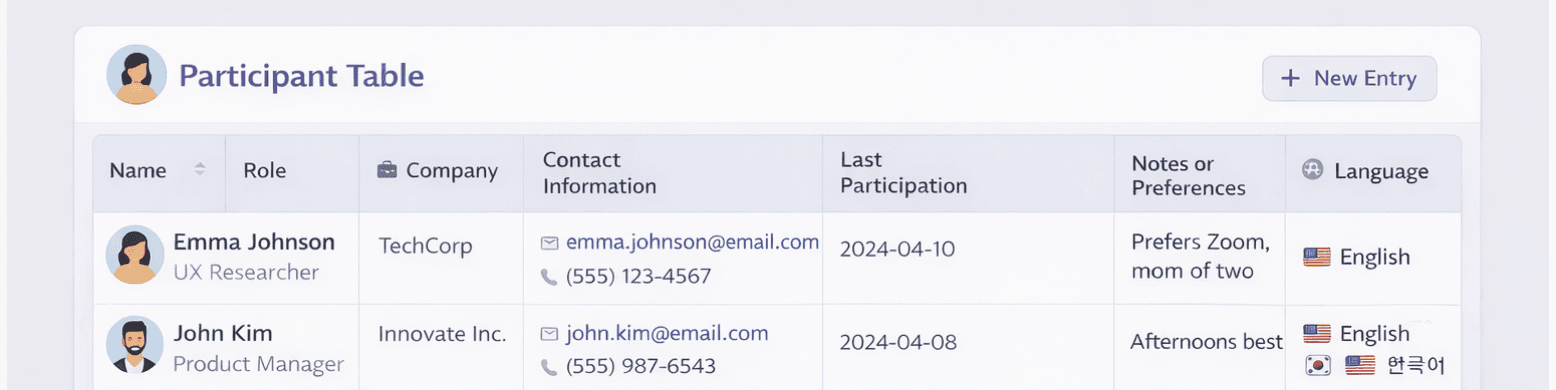
What to include
Name
Role
Company
Contact information
Product(s) used
Last participation date
Consent status (contact + recording)
Notes or preferences
Language (it can be interesting, if you work with worldwide customers)
Keep it GDPR compliant:
Create a private, access‑restricted page visible only to the relevant stakeholders involved in user research (e.g., PMs, Designers, Research Ops, Legal, if needed).
This ensures:
Only people who must process the data can access it (principle of data minimization)
Sensitive information (emails, recordings, transcripts) is not publicly exposed
Consent tracking remains centralized and secure
This step becomes your single source of truth for research recruitment and ensures you’re not risking compliance issues later when the research practice grows.
3) Set up simple recruitment & scheduling
Shared calendar slots, email/Teams templates, and a central page listing upcoming interviews. The bar: any designer/PM can book a study in <10 minutes.
4) Nail consent, privacy, and storage
Use two consents:
(1) permission to be contacted; (2) permission to record (audio/video). Add consent fields to the database and standardize where recordings live.
5) Define a one‑page research process
Clarify when to research, what method to choose, who’s involved, where data goes, and expected deliverables. Process clarity > tool sophistication.
6) Centralize insights
Basic repository: start with a single source of truth, such as Notion or Confluence. Even a simple, well-tagged repository helps prevent valuable insights from getting lost and enables teams to reuse knowledge across projects. If you have the budget, Dovetail or Usedge are powerful options. I’ll dive into those later 😉.
7) Build a toolkit (methods + templates)
Provide scripts, screener templates, consent forms, note‑taking docs, debrief guides, and reporting templates. Templates reduce friction and improve quality.
8) Share insights people will actually use (includes template)
Running research is half the job; making insights visible and actionable is how you drive decisions.
Use a clear, repeatable Insight Template:
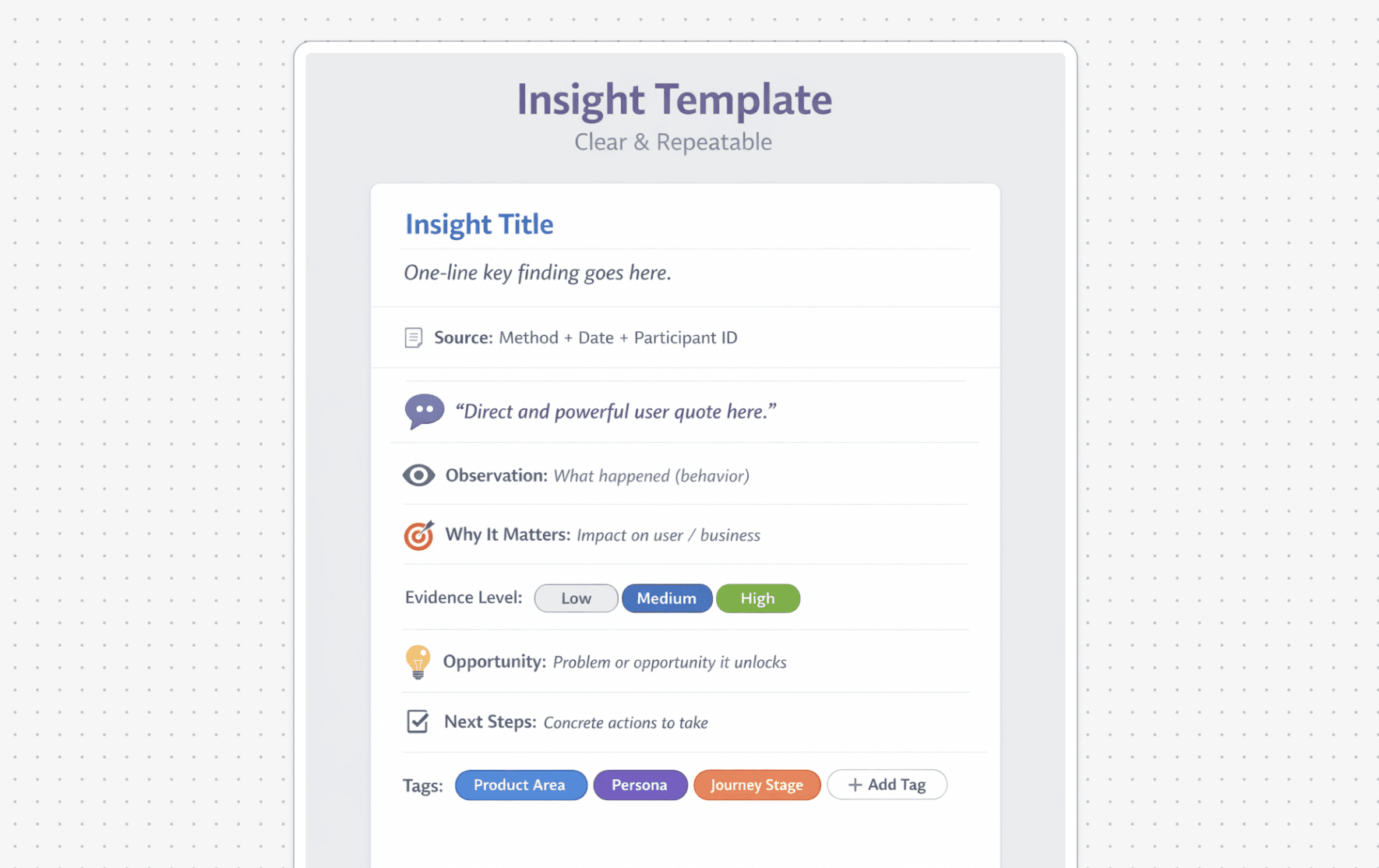

Store these in your repository so teams can search, sort, and re‑use them across cycles.
9) Summaries → reports
We started by encouraging product designers to share insights regularly, not just at the end of a project.
We quickly noticed that busy stakeholders rarely read long reports (and it’s probably the same everywhere): they scan 1-page summaries, watch a 2-minute Loom, or skim insight cards in Slack or Teams.
Focus on what matters, why it matters, and what to do next.
Always link to the full evidence for those who want to go deeper.
10) Broadcast, regularly
One next step I’d like to explore is broadcasting insights more regularly — via a monthly Research Digest and a living #research-insights channel. The goal is to turn research into shared organizational memory, not a one-off exercise.
A compact roadmap you can adapt
There’s no one-size-fits-all approach, but this compact roadmap can help you get started. Use it as a guide, not a rulebook.
First 3–6 months -> foundations
This phase is about putting the basics in place. Keep it simple, focus on clarity, and avoid over-engineering too early.
Research audit: choose a single “home” for insights
Participant database + consent flow
Lightweight scheduling
One‑page process + starter templates
Months 6–12 -> enable & scale
Once the foundations are solid, the goal is to help others run better research and start scaling impact across teams.
Repository taxonomy + insight template
Internal training for PMs/Designers (“how to run a good study”)
Regular sharing cadence (digest, show‑and‑tell)
Tooling guidelines; pilot 1–2 tools for repository/feedback
Year 2 -> optimize & automate
At this stage, Research Ops becomes a system. The focus shifts to efficiency, automation, and clear ownership.
Automate recruitment and scheduling
Standardize consent capture in tools
Expand repository coverage (triangulate CX/analytics/CS data)
Define Ops ownership: who runs logistics, training, and governance
I hope this gives you a useful starting point and the confidence to adapt it to your own reality.
What I learned implementing Research Ops
Start small, iterate fast. A clear process beats a perfect one.
Consistency is more important than tools. Tools help, but standards create maturity.
Advocacy is part of the job. Visibility builds momentum.
Make adoption easy. People follow the path of least resistance.
Share relentlessly. Insights must lead to decisions, not archives.
Want to grow Research Ops or Design Ops in your company? Let’s talk.
If you’re reading this and thinking, “We need this,” you’re not alone. I was in the same place two years ago.
Research Ops (and Design Ops) can be powerful accelerators for teams that want to make better decisions, move faster, and build with clarity — even with limited time or budget.
If you’d like help getting started, structuring your Research Ops, or simply want a second opinion on where to begin 👉 Feel free to contact me on LinkedIn. I’m always happy to help.
Let’s grow our Ops practice together and make research a visible, strategic force inside your organization.
Sources & further reading
ResearchOps Community — What is ResearchOps, definition & scope. researchops.community/about
Eight Pillars of User Research — foundation for ReOps practice. ResearchOps Community on Medium
User Interviews — State of User Research (2024) — ratios (ReOps supports 10–25 people), buy‑in, scarcity of ReOps, AI usage. Report
Roundup on current research trends — demand, democratization, tools. Experientia summary of Maze & UI reports
NN/g framing of ResearchOps — orchestration & optimization within DesignOps. ResearchOps 101 (NN/g reference)
Why repositories help — single source of truth to prevent lost work and enable sharing. UserTesting: What is a research repository?
More to Discover

How to Start, Structure, and Scale Your Research Operations
Practical guide to start and improve you research
Resources
Dec 10, 2025
Design teams everywhere feel the same pain when Research Ops is missing: scattered research, lost insights, inconsistent methods, no recruitment process, and no time to do research properly.
Research Ops (Research Operations) exists to fix exactly that.
Press enter or click to view image in full size
Whether you’re a solo designer, part of a small team, or working inside a growing product organization, Research Ops can transform the way your company understands users. And the best part?
You don’t need a research team to begin.
I started implementing Research Ops in my company without any dedicated researchers, and you can too.
This article is a guide for any designer, PM, or UX practitioner who wants to introduce Research Ops and doesn’t know where to begin.
What Exactly Is Research Ops?
ResearchOps (short for Research Operations) is a specialized area of DesignOps focused on user-research practices. Research Ops includes all the processes, tools, and supports that make research structured, scalable, ethical, and impactful.
In practice, Research Ops helps you with:
Participant recruitment
Interview scheduling
Consent and legal compliance
Knowledge management
Tool selection and training
Templates and process documentation
Research culture and advocacy
Logistics, data backup, and governance
Think of it as everything that surrounds research, so designers can actually do research instead of getting stuck preparing it.
Why Every Team Needs Research Ops Even Without Researchers
Most teams think they “do research.” But without structure, three things usually happen:
Insights get lost
Interviews live in random folders, tools, or personal notes.Research becomes slow and inconsistent
Each designer reinvents the wheel, using different methods and formats.No one has a shared understanding of users
Personas go stale, insights aren’t reused, and decisions rely on partial data.
Research Ops addresses this by creating repeatable systems that make research visible, accessible, and usable across teams.
Beyond day-to-day chaos, there’s a clear macro trend: research is scaling faster than organizational processes.
More non-researchers (Designers, PMs) are running studies.
Research activity is increasingly embedded across Product and UX.
A single Research Ops specialist typically supports 10–25 people, and sometimes more in larger organizations.
Yet 62% of companies still have no Research Ops function, even as research volume increases.
The result? Without Research Ops, more research often means more cost, duplication, and inefficiency. With Research Ops, teams benefit from shared assets, standardized workflows, and economies of scale.
At its core, Research Ops turns research from isolated efforts into a repeatable engine, one that scales with your organization and improves speed, quality, and reuse of knowledge over time.
Your practical starting plan (step‑by‑step)
I put together a practical starting plan, and I want to start with something honest.
Two years ago, I was exactly in this situation.
No budget.
No dedicated research team.
No real time.
Just a growing list of internal pain points:
struggling to find insights,
scattered documents,
duplicated work,
difficulty accessing relevant data,
and increasing pressure to make user‑informed decisions.
We were going through a restructuring, resources were tight, and research was nobody’s “job”… yet everybody needed it.
So I made a decision:
If no one is fixing it, we can address the pain points ourselves without a budget.
That’s the spirit of Research Ops.
You don’t need a big team or perfect tools. You need clarity, consistency, and the willingness to start small and iterate.
Below is the step-by-step approach I used, but it’s not a one-size-fits-all recipe. What you put in place should be driven by what you uncover during your research audit and by your company’s level of maturity.
1) Audit the “current state of research.”
Map where research lives today: interviews, findings, personas, tools, storage, consent, what’s working vs. not. This reveals gaps and quick wins.
2. Build a User & Customer Research Database (GDPR‑friendly)
You can’t scale research without knowing who you can talk to.
But because this involves personal data, you need to build it in a GDPR‑secure way from day one.
Start simple, a spreadsheet, Notion, Airtable, or a Confluence page works perfectly.
What matters is the structure and the access control.
What to include
Name
Role
Company
Contact information
Product(s) used
Last participation date
Consent status (contact + recording)
Notes or preferences
Language (it can be interesting, if you work with worldwide customers)
Keep it GDPR compliant:
Create a private, access‑restricted page visible only to the relevant stakeholders involved in user research (e.g., PMs, Designers, Research Ops, Legal, if needed).
This ensures:
Only people who must process the data can access it (principle of data minimization)
Sensitive information (emails, recordings, transcripts) is not publicly exposed
Consent tracking remains centralized and secure
This step becomes your single source of truth for research recruitment and ensures you’re not risking compliance issues later when the research practice grows.
3) Set up simple recruitment & scheduling
Shared calendar slots, email/Teams templates, and a central page listing upcoming interviews. The bar: any designer/PM can book a study in <10 minutes.
4) Nail consent, privacy, and storage
Use two consents:
(1) permission to be contacted; (2) permission to record (audio/video). Add consent fields to the database and standardize where recordings live.
5) Define a one‑page research process
Clarify when to research, what method to choose, who’s involved, where data goes, and expected deliverables. Process clarity > tool sophistication.
6) Centralize insights
Basic repository: start with a single source of truth, such as Notion or Confluence. Even a simple, well-tagged repository helps prevent valuable insights from getting lost and enables teams to reuse knowledge across projects. If you have the budget, Dovetail or Usedge are powerful options. I’ll dive into those later 😉.
7) Build a toolkit (methods + templates)
Provide scripts, screener templates, consent forms, note‑taking docs, debrief guides, and reporting templates. Templates reduce friction and improve quality.
8) Share insights people will actually use (includes template)
Running research is half the job; making insights visible and actionable is how you drive decisions.
Use a clear, repeatable Insight Template:
Store these in your repository so teams can search, sort, and re‑use them across cycles.
9) Summaries → reports
We started by encouraging product designers to share insights regularly, not just at the end of a project.
We quickly noticed that busy stakeholders rarely read long reports (and it’s probably the same everywhere): they scan 1-page summaries, watch a 2-minute Loom, or skim insight cards in Slack or Teams.
Focus on what matters, why it matters, and what to do next.
Always link to the full evidence for those who want to go deeper.
10) Broadcast, regularly
One next step I’d like to explore is broadcasting insights more regularly — via a monthly Research Digest and a living #research-insights channel. The goal is to turn research into shared organizational memory, not a one-off exercise.
A compact roadmap you can adapt
There’s no one-size-fits-all approach, but this compact roadmap can help you get started. Use it as a guide, not a rulebook.
First 3–6 months -> foundations
This phase is about putting the basics in place. Keep it simple, focus on clarity, and avoid over-engineering too early.
Research audit: choose a single “home” for insights
Participant database + consent flow
Lightweight scheduling
One‑page process + starter templates
Months 6–12 -> enable & scale
Once the foundations are solid, the goal is to help others run better research and start scaling impact across teams.
Repository taxonomy + insight template
Internal training for PMs/Designers (“how to run a good study”)
Regular sharing cadence (digest, show‑and‑tell)
Tooling guidelines; pilot 1–2 tools for repository/feedback
Year 2 -> optimize & automate
At this stage, Research Ops becomes a system. The focus shifts to efficiency, automation, and clear ownership.
Automate recruitment and scheduling
Standardize consent capture in tools
Expand repository coverage (triangulate CX/analytics/CS data)
Define Ops ownership: who runs logistics, training, and governance
I hope this gives you a useful starting point and the confidence to adapt it to your own reality.
What I learned implementing Research Ops
Start small, iterate fast. A clear process beats a perfect one.
Consistency is more important than tools. Tools help, but standards create maturity.
Advocacy is part of the job. Visibility builds momentum.
Make adoption easy. People follow the path of least resistance.
Share relentlessly. Insights must lead to decisions, not archives.
Want to grow Research Ops or Design Ops in your company? Let’s talk.
If you’re reading this and thinking, “We need this,” you’re not alone. I was in the same place two years ago.
Research Ops (and Design Ops) can be powerful accelerators for teams that want to make better decisions, move faster, and build with clarity — even with limited time or budget.
If you’d like help getting started, structuring your Research Ops, or simply want a second opinion on where to begin 👉 Feel free to contact me on LinkedIn. I’m always happy to help.
Let’s grow our Ops practice together and make research a visible, strategic force inside your organization.
Sources & further reading
ResearchOps Community — What is ResearchOps, definition & scope. researchops.community/about
Eight Pillars of User Research — foundation for ReOps practice. ResearchOps Community on Medium
User Interviews — State of User Research (2024) — ratios (ReOps supports 10–25 people), buy‑in, scarcity of ReOps, AI usage. Report
Roundup on current research trends — demand, democratization, tools. Experientia summary of Maze & UI reports
NN/g framing of ResearchOps — orchestration & optimization within DesignOps. ResearchOps 101 (NN/g reference)
Why repositories help — single source of truth to prevent lost work and enable sharing. UserTesting: What is a research repository?
More to Discover
How to Start, Structure, and Scale Your Research Operations
Practical guide to start and improve you research
Resources
Dec 10, 2025
Design teams everywhere feel the same pain when Research Ops is missing: scattered research, lost insights, inconsistent methods, no recruitment process, and no time to do research properly.
Research Ops (Research Operations) exists to fix exactly that.
Press enter or click to view image in full size
Whether you’re a solo designer, part of a small team, or working inside a growing product organization, Research Ops can transform the way your company understands users. And the best part?
You don’t need a research team to begin.
I started implementing Research Ops in my company without any dedicated researchers, and you can too.
This article is a guide for any designer, PM, or UX practitioner who wants to introduce Research Ops and doesn’t know where to begin.
What Exactly Is Research Ops?
ResearchOps (short for Research Operations) is a specialized area of DesignOps focused on user-research practices. Research Ops includes all the processes, tools, and supports that make research structured, scalable, ethical, and impactful.
In practice, Research Ops helps you with:
Participant recruitment
Interview scheduling
Consent and legal compliance
Knowledge management
Tool selection and training
Templates and process documentation
Research culture and advocacy
Logistics, data backup, and governance
Think of it as everything that surrounds research, so designers can actually do research instead of getting stuck preparing it.
Why Every Team Needs Research Ops Even Without Researchers
Most teams think they “do research.” But without structure, three things usually happen:
Insights get lost
Interviews live in random folders, tools, or personal notes.Research becomes slow and inconsistent
Each designer reinvents the wheel, using different methods and formats.No one has a shared understanding of users
Personas go stale, insights aren’t reused, and decisions rely on partial data.
Research Ops addresses this by creating repeatable systems that make research visible, accessible, and usable across teams.
Beyond day-to-day chaos, there’s a clear macro trend: research is scaling faster than organizational processes.
More non-researchers (Designers, PMs) are running studies.
Research activity is increasingly embedded across Product and UX.
A single Research Ops specialist typically supports 10–25 people, and sometimes more in larger organizations.
Yet 62% of companies still have no Research Ops function, even as research volume increases.
The result? Without Research Ops, more research often means more cost, duplication, and inefficiency. With Research Ops, teams benefit from shared assets, standardized workflows, and economies of scale.
At its core, Research Ops turns research from isolated efforts into a repeatable engine, one that scales with your organization and improves speed, quality, and reuse of knowledge over time.
Your practical starting plan (step‑by‑step)
I put together a practical starting plan, and I want to start with something honest.
Two years ago, I was exactly in this situation.
No budget.
No dedicated research team.
No real time.
Just a growing list of internal pain points:
struggling to find insights,
scattered documents,
duplicated work,
difficulty accessing relevant data,
and increasing pressure to make user‑informed decisions.
We were going through a restructuring, resources were tight, and research was nobody’s “job”… yet everybody needed it.
So I made a decision:
If no one is fixing it, we can address the pain points ourselves without a budget.
That’s the spirit of Research Ops.
You don’t need a big team or perfect tools. You need clarity, consistency, and the willingness to start small and iterate.
Below is the step-by-step approach I used, but it’s not a one-size-fits-all recipe. What you put in place should be driven by what you uncover during your research audit and by your company’s level of maturity.
1) Audit the “current state of research.”
Map where research lives today: interviews, findings, personas, tools, storage, consent, what’s working vs. not. This reveals gaps and quick wins.
2. Build a User & Customer Research Database (GDPR‑friendly)
You can’t scale research without knowing who you can talk to.
But because this involves personal data, you need to build it in a GDPR‑secure way from day one.
Start simple, a spreadsheet, Notion, Airtable, or a Confluence page works perfectly.
What matters is the structure and the access control.
What to include
Name
Role
Company
Contact information
Product(s) used
Last participation date
Consent status (contact + recording)
Notes or preferences
Language (it can be interesting, if you work with worldwide customers)
Keep it GDPR compliant:
Create a private, access‑restricted page visible only to the relevant stakeholders involved in user research (e.g., PMs, Designers, Research Ops, Legal, if needed).
This ensures:
Only people who must process the data can access it (principle of data minimization)
Sensitive information (emails, recordings, transcripts) is not publicly exposed
Consent tracking remains centralized and secure
This step becomes your single source of truth for research recruitment and ensures you’re not risking compliance issues later when the research practice grows.
3) Set up simple recruitment & scheduling
Shared calendar slots, email/Teams templates, and a central page listing upcoming interviews. The bar: any designer/PM can book a study in <10 minutes.
4) Nail consent, privacy, and storage
Use two consents:
(1) permission to be contacted; (2) permission to record (audio/video). Add consent fields to the database and standardize where recordings live.
5) Define a one‑page research process
Clarify when to research, what method to choose, who’s involved, where data goes, and expected deliverables. Process clarity > tool sophistication.
6) Centralize insights
Basic repository: start with a single source of truth, such as Notion or Confluence. Even a simple, well-tagged repository helps prevent valuable insights from getting lost and enables teams to reuse knowledge across projects. If you have the budget, Dovetail or Usedge are powerful options. I’ll dive into those later 😉.
7) Build a toolkit (methods + templates)
Provide scripts, screener templates, consent forms, note‑taking docs, debrief guides, and reporting templates. Templates reduce friction and improve quality.
8) Share insights people will actually use (includes template)
Running research is half the job; making insights visible and actionable is how you drive decisions.
Use a clear, repeatable Insight Template:
Store these in your repository so teams can search, sort, and re‑use them across cycles.
9) Summaries → reports
We started by encouraging product designers to share insights regularly, not just at the end of a project.
We quickly noticed that busy stakeholders rarely read long reports (and it’s probably the same everywhere): they scan 1-page summaries, watch a 2-minute Loom, or skim insight cards in Slack or Teams.
Focus on what matters, why it matters, and what to do next.
Always link to the full evidence for those who want to go deeper.
10) Broadcast, regularly
One next step I’d like to explore is broadcasting insights more regularly — via a monthly Research Digest and a living #research-insights channel. The goal is to turn research into shared organizational memory, not a one-off exercise.
A compact roadmap you can adapt
There’s no one-size-fits-all approach, but this compact roadmap can help you get started. Use it as a guide, not a rulebook.
First 3–6 months -> foundations
This phase is about putting the basics in place. Keep it simple, focus on clarity, and avoid over-engineering too early.
Research audit: choose a single “home” for insights
Participant database + consent flow
Lightweight scheduling
One‑page process + starter templates
Months 6–12 -> enable & scale
Once the foundations are solid, the goal is to help others run better research and start scaling impact across teams.
Repository taxonomy + insight template
Internal training for PMs/Designers (“how to run a good study”)
Regular sharing cadence (digest, show‑and‑tell)
Tooling guidelines; pilot 1–2 tools for repository/feedback
Year 2 -> optimize & automate
At this stage, Research Ops becomes a system. The focus shifts to efficiency, automation, and clear ownership.
Automate recruitment and scheduling
Standardize consent capture in tools
Expand repository coverage (triangulate CX/analytics/CS data)
Define Ops ownership: who runs logistics, training, and governance
I hope this gives you a useful starting point and the confidence to adapt it to your own reality.
What I learned implementing Research Ops
Start small, iterate fast. A clear process beats a perfect one.
Consistency is more important than tools. Tools help, but standards create maturity.
Advocacy is part of the job. Visibility builds momentum.
Make adoption easy. People follow the path of least resistance.
Share relentlessly. Insights must lead to decisions, not archives.
Want to grow Research Ops or Design Ops in your company? Let’s talk.
If you’re reading this and thinking, “We need this,” you’re not alone. I was in the same place two years ago.
Research Ops (and Design Ops) can be powerful accelerators for teams that want to make better decisions, move faster, and build with clarity — even with limited time or budget.
If you’d like help getting started, structuring your Research Ops, or simply want a second opinion on where to begin 👉 Feel free to contact me on LinkedIn. I’m always happy to help.
Let’s grow our Ops practice together and make research a visible, strategic force inside your organization.
Sources & further reading
ResearchOps Community — What is ResearchOps, definition & scope. researchops.community/about
Eight Pillars of User Research — foundation for ReOps practice. ResearchOps Community on Medium
User Interviews — State of User Research (2024) — ratios (ReOps supports 10–25 people), buy‑in, scarcity of ReOps, AI usage. Report
Roundup on current research trends — demand, democratization, tools. Experientia summary of Maze & UI reports
NN/g framing of ResearchOps — orchestration & optimization within DesignOps. ResearchOps 101 (NN/g reference)
Why repositories help — single source of truth to prevent lost work and enable sharing. UserTesting: What is a research repository?